Tag: conversion optimization

  • Unleashing the Power of Google Ads: The Art of Conversion Optimization

    Unleashing the Power of Google Ads: The Art of Conversion Optimization

    In today’s digital landscape, businesses strive to make their online presence count. Google Ads has emerged as a powerful tool that enables companies to reach their target audience effectively. However, merely running ads is not enough. To maximize the return on investment (ROI) and drive tangible results, businesses must master the art of conversion optimization. In this blog post, we will explore the symbiotic relationship between Google Ads and conversion optimization, uncovering strategies to optimize campaigns and boost conversion rates.

    Understanding Google Ads

    Google Ads is an online advertising platform that allows businesses to create and display ads on Google’s search engine and partner websites. With its vast reach and targeting capabilities, Google Ads has become a go-to channel for local businesses seeking to attract potential customers.

    What is Conversion Optimization?

    Conversion optimization is the process of refining and improving the user experience to increase the likelihood of desired actions, such as leads, sales, sign-ups, or inquiries. It involves analyzing user behavioir, testing different elements, and making data-driven decisions to enhance conversion rates.
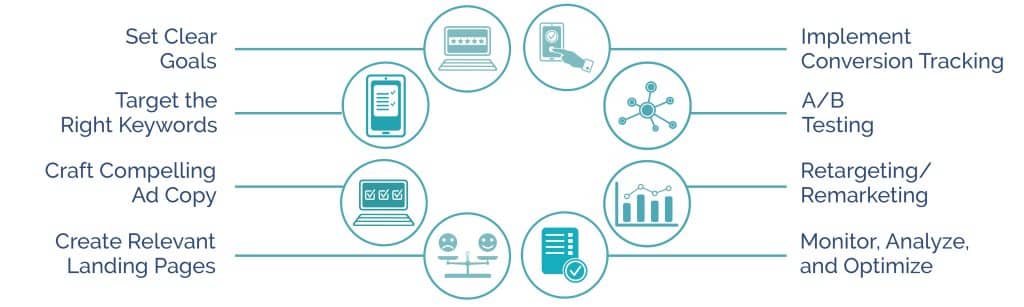
    Conversion optimization process

    The Synergy between Google Ads and Conversion Optimization

    Google Ads provides a valuable opportunity to generate traffic and leads. However, without effective conversion optimization, businesses may struggle to capitalize on the influx of visitors. By integrating conversion optimization techniques into Google Ads campaigns, companies can maximize the potential of each click and turn visitors into customers.

    • Set Clear Goals: Before launching a Google Ads campaign, it’s crucial to define specific goals. Whether it’s generating leads or sales, increasing newsletter sign-ups, or driving website traffic, setting clear objectives allows for focused optimization efforts.
    • Target the Right Keywords: Keyword research plays a pivotal role in Google Ads success. By understanding the search intent of your target audience, you can create highly relevant ads that align with their needs. Ensure your keywords are aligned with your landing page content to improve ad quality scores.
    • Craft Compelling Ad Copy: Captivating ad copy is key to enticing users to click on your ads. Incorporate persuasive language, unique selling propositions, and strong calls to action (CTAs). Regularly test different ad variations to identify the most effective messaging.
    • Create Relevant Landing Pages: A seamless user experience from ad to landing page is vital for conversion optimization. Ensure that your landing pages are tailored to match the ad’s message and offer relevant information and a clear path to conversion. Optimize landing page load times and design for mobile devices.
    • Implement Conversion Tracking: Tracking conversions is crucial for understanding the performance of your campaigns. Utilize Google Ads conversion tracking or integrate third-party tools to gain insights into which keywords, ads, and landing pages are driving the most conversions.
    • A/B Testing: Experimentation is key to continuous improvement. Conduct A/B tests on various elements, such as headlines, CTAs, colors, and layouts, to identify high-performing combinations. Use statistical significance to determine the winning variations.
    • Retargeting/Remarketing: Not all users convert on their first visit. Implementing retargeting campaigns allows you to reach out to users who have previously shown interest in your products or services. Tailor retargeting ads to remind and incentivize them to return and complete the desired action.
    • Monitor, Analyze, and Optimize: Regularly monitor the performance of your Google Ads campaigns. Leverage analytics tools to gain valuable insights into user behavior, engagement, and conversion rates. Continuously optimize your campaigns based on the data, making data-driven decisions to enhance results.

    Conclusion

    Google Ads is a powerful advertising platform that, when combined with effective conversion optimization strategies, can propel your business to new heights. By aligning ad content, landing pages, and user experience, you can enhance conversion rates, boost ROI, and drive sustainable growth.

  • The Anatomy of a Website Design Project: What’s Included?

    The Anatomy of a Website Design Project: What’s Included?

    Designing a website involves a lot more than just choosing colours and typing up content. It’s a multi-dimensional process that involves several stages, from defining the project’s scope to testing and launching the site. Let’s take a look at what’s included in a website design project.

    1. Project Definition and Scope

    Before any design work begins, it’s crucial to define the purpose and scope of the website. This includes determining what the website aims to achieve, its target audience, and what content it should have. A clear definition of the project will guide the entire design process.

    The project scope, on the other hand, defines the specific activities, deadlines, and deliverables involved in the project. Defining the scope prevents the project from expanding beyond its initial expectations, a phenomenon known as “scope creep”.

    2. Site Architecture and Wireframing

    Once the project’s scope is defined, the next step is to plan the site’s architecture. This involves creating a sitemap that outlines the main areas and pages of the website, ensuring logical navigation for users.

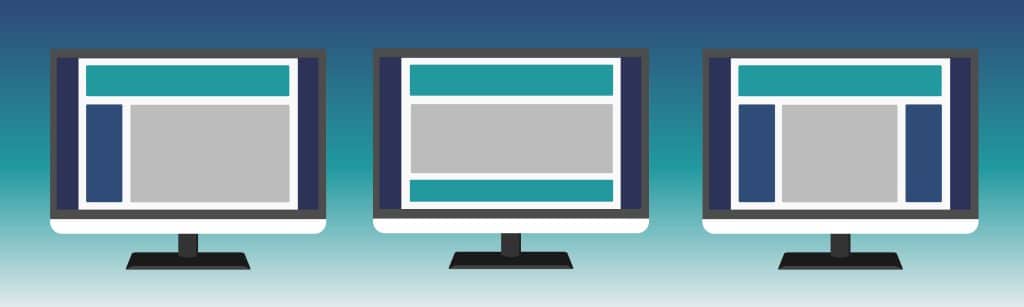
    Wireframes are also created at this stage. These are blueprints of each page, showing where various elements such as navigation, content, and images will be located. Wireframes are essential for understanding the website’s functionality and user flow without being distracted by design elements.

    web design wireframes

    3. Design and Mockups

    This is where the visual elements come into play. Designing involves selecting colours, typography, and imagery that align with the brand identity and appeal to the target audience. The designer will create a mockup or prototype of the website that includes these design elements, along with the layout determined in the wireframing stage.

    4. Content Creation

    While design is crucial, content is king. It’s during this stage that the website’s text, images, and videos are discussed and planned. Clients will either provide the content for the website, or the marketing team will write and optimize the content for both users and search engines. This includes writing compelling headlines, informative descriptions, engaging blog posts, and more. For best results, content should be tailored to the target audience and convey the brand’s message effectively.

    5. Development

    Once the design and content are ready, the next step is to bring them together in the development stage. Developers translate the design mockups into HTML, CSS, and JavaScript to create a functional website. This stage may also involve setting up a Content Management System (CMS) like WordPress, configuring databases, and implementing other back-end tasks.

    6. Quality Assurance and Testing

    Before a website goes live, it must undergo rigorous testing. This includes checking for any coding errors, broken links, and compatibility issues across different devices and browsers. User testing can also be performed to see how real users interact with the site and make necessary improvements.

    7. Launch

    The final step in a website design project is launching the website. This means transferring the website from a local development environment to a live server, which makes it accessible to the public. The launch is typically followed by a period of post-launch support to fix any unforeseen issues that arise.

    8. Maintenance and Updates

    A website is never truly “finished”. It needs regular updates and maintenance to stay relevant and functional. This includes updating content, fixing bugs, improving user experience, and more.

    In summary, a website design project involves several distinct but interconnected stages. Each stage requires careful planning and execution to ensure the final product aligns with the initial vision and serves its intended purpose effectively. Understanding what’s included in a website design project can help stakeholders manage their expectations and contribute more effectively to the project’s success.

    Need a new website? View our website design packages and contact us for a free consultation and estimate.

  • 3 Timeless Principles of Web Design That Will Boost Your Business

    3 Timeless Principles of Web Design That Will Boost Your Business

    Web design has changed a lot over the past few decades, with new technologies and tools appearing all the time. If you want to build a great website that converts visitors into customers, you might think that you should follow the latest flashy trends. But there are some fundamental principles of web design that have remained constant. While trends come and go, and can quickly make your website look outdated, design principles that have stood the test of time guarantee quality design that lasts. Read on to learn about 3 timeless principles of web design that can boost your business’s website!

    Consistency and Standards

    Imagine a person visiting your site for the first time. They should be able to navigate around easily, without getting lost or experiencing unnecessary confusion. Adhering to well-established web design conventions and maintaining consistency throughout your website helps visitors find what they are looking for, which makes them more likely to make a purchase.

    Adherence to Conventions

    Over time, many conventions have become entrenched in the world of web design. For example, most websites have the logo at top left. The main navigation is shown along the top on desktop computers, and collapses behind a clickable hamburger (or three line) icon on mobile devices. Besides the hamburger icon, there are many other familiar icons, such as the shopping cart on e-commerce websites. You might be tempted to do something different on your website, thinking yourself more creative, but making use of these familiar design patterns and elements ensures that visitors to your site can leverage their previous experience with other websites to quickly navigate through your site.

    Web design standards

    Internal Consistency

    Your website should also maintain internal consistency, meaning it should have a consistent layout and navigation, a specific colour and typography scheme, and consistent use of images across all the pages of your site. Remember that it’s not just about how it looks, but also how it functions! For example, buttons and menu items should both look the same and behave in a consistent way when they are clicked. Creating cohesion and organization gives visitors a sense of familiarity and trust when they’re browsing different pages or sections within your site. And trust is important to people when choosing which business to buy from.

    Aesthetics and Minimalist Design

    Clear and minimalistic design guides visitors through your website and presents them with content in a logical order – without unnecessary clutter. Someone visiting your site usually has a clear goal. They want to understand what you’re offering and decide whether they want to purchase from you. Keeping your site simple and aesthetically pleasing makes it easier for visitors to complete their goal without distraction. You can create a clean look by utilizing white space, and keeping the number of different colours and fonts used to a minimum.

    minimalist design

    User Experience and Usability

    User experience and usability are often overlooked aspects that can determine whether a visitor decides to stay on your site or leaves. User experience design focuses on making sure you’re always designing with your audience in mind. One part of that is usability, which focuses on keeping your website easy to use.

    Responsive web design is one of the most important aspects of user experience and usability. Making your website responsive gives visitors a seamless experience across all screens, including smartphones, tablets, laptops, and desktops. With many people accessing websites on their phone and abandoning them when they don’t work well on mobile, it’s crucial to make sure your site is designed for the way people use their devices.

    Get a Free Web Design Consultation for Your Business

    At Longevity Graphics, we work with business owners to create websites that convert! We design and build WordPress websites using the latest trends and technologies, but with an understanding of proven design principles.

    For a limited time, we are also offering 25% off web design and no interest financing. Get in touch with us for a free 1-hour web design consultation to learn how we can help your business reach its online potential.

  • Easy Tips for Designing a Killer Website that Converts!

    A Poorly Designed Website Can Kill Your Sales

    It is very important to have a website, and now more than ever, it needs to reflect your business, service or product. Having a professional website can make or break a sale. Your website is usually the first or second contact with a new customer. They either find you by doing a search within a search engine like Google or Bing, or they find your business via another source and they look up your website to find out more information about your business, product, or service.

    Have you ever done business with a company that offers an amazing product or service, and their website just doesn’t reflect amazingness? They could be losing new business daily! Do them a huge favour, and let them know about the experience you had with their website. They can not change something that they are not aware of.

    Tips for designing a killer website that converts into positive ROI!

    1. Use Great Graphics

    Having poor graphics can decrease the value of your website. Make sure your graphics are high quality and are not pixelated. If you are designing your website on your own (which some small businesses do) make sure you get someone to help with the graphics that you design or choose. iStock is a great place to purchase high quality graphics.

    2. Make Sure It Looks Professional

    I know that lots of business owners like to save money. Realistically, we all do. Having a budget to have your website designed professionally is important. Cheaping out and getting your site built by a friend, a student, or your own kid who took a course in high-school will only cost you money and sales in the end.

    I have worked with many businesses that had their first website designed by someone new in the design industry, and I have found that the level of professionalism was just not there. Having a website that isn’t functional, or looks thrown together is only going to leave a bad impression with your potential customers about your product or service.

    3. Spell & Grammar Check Your Content

    How many times have you gone to a website and found errors throughout the content? It doesn’t reflect well on the business. The impression that you are giving is that you don’t care to do things well. Again, have someone go over the content to correct the errors. It can be a friend, colleague, employee or spouse. It takes just one look-over to find some errors that you just didn’t see because you had been staring at it for too many hours. It is worth it in the end.

    4. Easy To Navigate

    Help your user find what they are looking for easily. Implement a user friendly navigational system. Have people test it out and provide feedback. Using a tracking program like crazyegg can give you some great feedback on the usefulness of your navigation.

    5. Make it Easy For Them To Contact You

    Your website is the perfect place to interact with your new customers. I have had many consultations with new clients that complain about their existing website not doing anything for them. When I look at the website, I find their contact information buried in their contact page. I recommend placing the business phone number dominantly in the header of the document on every page so that the user doesn’t have to search for it. Also, I always add a simple contact form to every page. Yes, I said every page! Most importantly, make sure that it is above the fold. This will definitely increase the chances of your customer contacting you. We have seen a website go from 0 calls to action to over 60 in 1 month just by adding a contact form. It’s not rocket science, it’s just smart design.


    Remember, when designing your business website, it is always best to hire a professional, so make sure that you set aside a budget when planning your marketing strategy for the year. Spending your marketing budget on great sources that drive traffic to your website is a worthwhile investment, but only if your website is setup to convert the traffic once it gets there.